Recently, I started building an automated video pipeline for my projects, and one piece of it needs an AI model that knows my face, so it can generate consistent pictures of me in any scene without a photographer. The usual way to do that is training a LoRA, a small add-on file that teaches an existing image model one new subject. Everything I read said you want 12GB of VRAM or more. My laptop has an RTX 4070 with 8GB.
It works. By the end of this post you’ll have the exact setup that trains a FLUX.2 Klein identity LoRA on 8GB in about four hours, and you’ll know the three silent failures I hit getting there. The first one had the trainer estimating nine days for the run. Each produces confusing symptoms, and none of them shows a proper error message.
Prerequisites
- An NVIDIA GPU with 8GB VRAM (I used an RTX 4070 Laptop; the display running on the integrated GPU helps, since almost all 8GB stays free)
- Windows with Python installed (I was on Python 3.13.5, which caused one of the problems below; 3.12 avoids it)
- Around 25GB free disk. The first run pulls three downloads (the 4B transformer, the Qwen3-4B text encoder at about 8GB, and the VAE), roughly 17GB in total, plus the training environment
- 12 to 20 photos of the subject: varied backgrounds, lighting, and clothing, no sunglasses or caps, no other people in frame
- A Hugging Face account for the model downloads
Why FLUX.2 Klein
I needed a commercially usable model, which rules out FLUX.1-dev and FLUX.2-dev (both non-commercial licenses). FLUX.2-klein-base-4B is Apache 2.0, and Black Forest Labs ships this base variant specifically for fine-tuning and LoRA work. It is undistilled, trained without step or guidance distillation, which keeps the full training signal intact and is also why the config below samples at 28 steps instead of a 4-step turbo setting. It is small enough that quantization brings it under 8GB. The trainer is ostris/ai-toolkit, which added Klein support recently. New model support means less competition for your generations. It also means you are one of the first people hitting its bugs.
One concept you need before the config makes sense: the base model stays frozen during LoRA training, so we can store it compressed in 8-bit floats (fp8) without losing anything in the final output. The LoRA itself, the thing you’re actually producing, trains and saves at full precision. Compressing the frozen part is what makes 8GB possible. Unquantized, the training footprint is around 13GB and would spill into system memory. In fp8 the whole thing fits the card, with the frozen transformer itself sitting around 4GB.
Setup
git clone https://github.com/ostris/ai-toolkit.git
cd ai-toolkit
python -m venv venv
.\venv\Scripts\Activate.ps1
python -m pip install --upgrade pip
pip install torch==2.6.0+cu124 torchvision torchaudio --index-url https://download.pytorch.org/whl/cu124
pip install -r requirements.txt
Two things went wrong right here. First, on Python 3.13 the requirements install died building scipy from source:
ERROR: Unknown compiler(s): [['ifort'], ['ifx'], ['gfortran'], ['flang-new'], ...]
error: metadata-generation-failed
The repo pins scipy==1.12.0, which has no prebuilt wheels for Python 3.13, so pip tries to compile it and goes looking for a Fortran compiler that no normal Windows machine has. The fix is relaxing the pin in requirements.txt from scipy==1.12.0 to scipy>=1.14 before installing. If a second package fails the same way, stop patching pins and rebuild the venv on Python 3.12 instead. ML tooling generally lags the newest Python by six months or more.
Second, my first launch crashed with ModuleNotFoundError: No module named 'torchaudio'. The toolkit imports it unconditionally, but the requirements file assumes you installed it alongside torch. The command above already includes it.
Note: you’ll also see WARNING:torchaudio.kernel.intmm: Detected no triton on Windows. That one is harmless. Triton doesn’t ship for Windows, and the fp8 path used here doesn’t need it. Linux users get triton and won’t see it.
Dataset and captions
I used 14 photos, curated hard from 44: no caps, no sunglasses, nobody else in frame, faces at least 500px tall, and no more than 2 photos from the same session so the model can’t latch onto one background. Each photo gets a .txt caption like this:
ohwx man, navy henley shirt, night street market with neon signs, front view, soft closed smileThe logic behind captions took me a while to get. You describe everything you want to stay changeable (clothes, background, light, angle) and deliberately never describe the face. Whatever the captions don’t explain has only one place to bind, the trigger token, “ohwx man” here. The caption is a routing table, not a description.
The config that fits 8GB
trigger_word: "ohwx man"
network:
  type: "lora"
  linear: 16
  linear_alpha: 16
save:
  dtype: float16
  save_every: 250               # checkpoints to compare later
  max_step_saves_to_keep: 8
datasets:
  - folder_path: "C:/path/to/your/photos"
    caption_ext: "txt"
    cache_latents_to_disk: true
    resolution: [768, 1024]
train:
  batch_size: 1
  steps: 3000
  gradient_checkpointing: true
  noise_scheduler: "flowmatch"
  optimizer: "adamw8bit"
  lr: 1e-4
  dtype: bf16
  cache_text_embeddings: true   # the 8GB make-or-break, explained below
  skip_first_sample: true
  ema_config:
    use_ema: true
    ema_decay: 0.99
model:
  name_or_path: "black-forest-labs/FLUX.2-klein-base-4B"
  arch: "flux2_klein_4b"
  quantize: true
  quantize_te: true
  low_vram: false               # counterintuitive - explained below
sample:
  sampler: "flowmatch"
  sample_every: 500
  width: 768
  height: 768
  guidance_scale: 4
  sample_steps: 28              # klein base is undistilled - no 4-step turbo settings
  seed: 1001
  walk_seed: false              # fixed seeds, so checkpoints compare 1:1
Two of those lines look wrong for an 8GB card. They’re the two that make it work, and each one cost me a failed run to figure out.
Failure 1: the setting whose name lied (9 days estimated)
My first run had low_vram: true. I have low VRAM, so that looked like the obvious choice. The result:
founder-klein-v1: 1%| 36/3000 [3:12:22<219:08:32, 266.16s/it]266 seconds per step. 219 hours remaining. Nine days, on a run that should take four hours. No error anywhere; as far as the trainer was concerned, it was working. Turns out low_vram doesn’t mean “optimize for low VRAM”. It means “park the main model in system RAM and stream it over PCIe on every single step”. The log even says so if you know what to look for: “Moving transformer to CPU” appears after quantization, and the model never comes back. The quantized transformer is only about 4GB. It fits on the card and belongs there. Setting low_vram: false took the step time from 266 seconds to roughly 5. The lesson: don’t trust a setting’s name. When a flag matters this much, read what the code actually does with it.
Failure 2: the silent freeze (Windows-specific)
Second attempt, correct speed, and then the run sat at “Generating Samples: 0%| 0/4” for over an hour. No error, no progress, GPU at 100%.
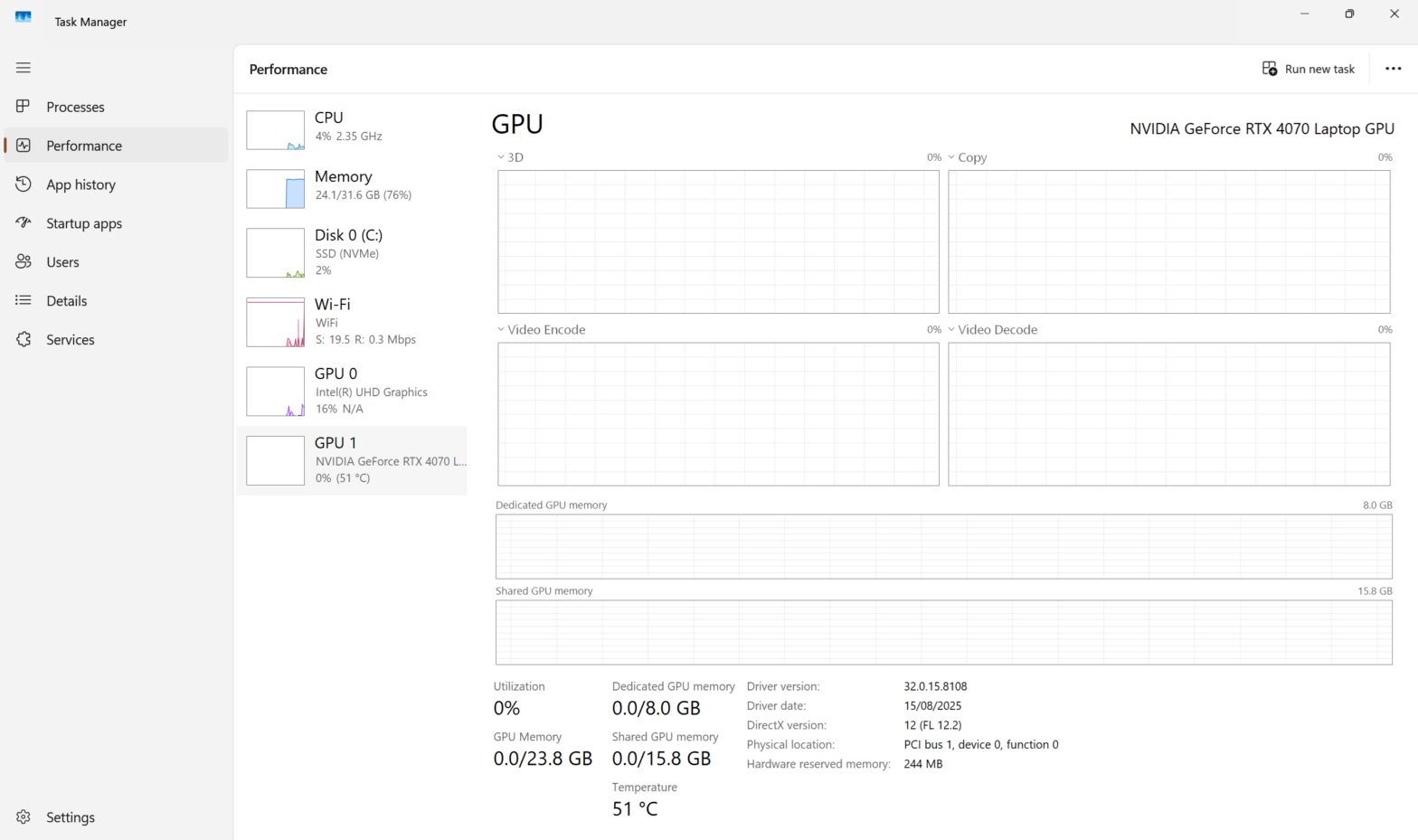
Task Manager told the story the logs wouldn’t: dedicated GPU memory pinned at 7.8/8.0 GB, and shared GPU memory at 8.4 GB and climbing. Sample generation loads the text encoder (Klein uses Qwen3-4B, itself about 4GB quantized) next to the transformer. That is 8GB of models on an 8GB card. The Windows-specific part: instead of failing with an out-of-memory error, the NVIDIA driver silently spills into system RAM and everything runs 10 to 50 times slower. On Linux the same situation typically just throws CUDA OOM, annoying but honest. On Windows you get no error and a run that crawls forever, so your monitoring panel is Task Manager’s GPU tab, not the console.
The fix is cache_text_embeddings: true. Your captions never change during training, so the toolkit encodes them once at startup, saves the result, and unloads the entire text encoder for the rest of the run. The log confirms it with a satisfying banner: ***** UNLOADING TEXT ENCODER *****. After that, only the transformer lives on the card and there’s room to breathe. One side effect: caption dropout silently becomes a no-op with cached embeddings, which is fine for an identity LoRA.
Here are the healthy numbers after both fixes, so you know what to expect: about 5.1 to 5.7 s/it at batch 1, roughly four hours of compute for 3000 steps, dedicated GPU memory settled around 6GB, shared memory near zero.
Failure 3: the preview that showed a different person
This one I only caught at step 500. The toolkit renders sample images during training so you can watch the identity form. My step-500 samples showed a woman. Long hair, different face, wrong gender, in exactly the scenes my prompts described, cafe lighting and all. Meanwhile the baseline samples from before training showed a man. Something was wrong with the prompts, not the training.
The answer was in the trainer’s source. Sample prompts support a [trigger] placeholder that normally gets replaced with your trigger word at sampling time. But with cache_text_embeddings enabled, sample prompts are pre-encoded at startup by a different code path (cache_sample_prompts() in SDTrainer.py) that never applies the substitution. The literal text “[trigger]” goes into the text encoder as junk tokens, the prompt effectively has no subject, and the model defaults to a generic person. Training itself was unaffected; my caption files contain the real trigger text, no placeholder. The fix is writing the trigger word literally in your sample prompts (“ohwx man, front view, …”) and never pairing [trigger] with cached embeddings. I corrected the prompts and resumed the run; the toolkit picks up from the last checkpoint automatically, optimizer state included.
As far as I can tell nobody has reported this combination yet. The existing issues on the repo cover different cache_text_embeddings problems. So if your training samples show a stranger while your captions look correct, this is the answer. The proper fix on the toolkit side would be applying the same trigger substitution inside the cached-prompt path before encoding, or at least warning when [trigger] is present while caching is on.
A bug like this is the price of using model support that shipped weeks ago. On a two-year-old pipeline, every mistake I made would already have a Stack Overflow answer. On code this new, the answer doesn’t exist until someone hits the bug, reads the source, and writes it down.
Windows vs Linux differences
- VRAM overflow: Windows spills silently into shared memory (slow, no error); Linux typically throws CUDA OOM (loud). On Windows, watch Task Manager’s dedicated vs shared GPU memory. That is your real monitoring.
- Triton: not available on Windows; the torchao warning is harmless for this fp8 workflow. Linux users get extra kernel options but need nothing here.
- Fortran/scipy builds: Windows machines have no Fortran compiler, so any pinned package without a wheel for your Python version fails loudly at install. Prefer Python 3.12, where the wheel coverage is complete.
- Paths in YAML: forward slashes work fine on Windows in this toolkit’s config (
C:/path/to/photos) and avoid escaping headaches. - WSL: I considered it and skipped it. The memory constraint is physics, not OS, and you’d re-download the whole Linux dependency stack for no VRAM gain.
The result
The run finished all 3000 steps in about four hours. Speed held at the 5.1 to 5.7 seconds per step I measured earlier, memory stayed inside the 8GB the whole way, and a checkpoint landed every 250 steps, eight of them saved by the end, ready to compare.
That comparison is where the fixed seeds in the config pay off. Every checkpoint renders the same prompts with the same seeds, so you can line the images up side by side and watch the face converge as the steps climb. I did exactly that, picked a winner, and the finished LoRA holds my identity across scenes, outfits, and lighting that appear nowhere in the 14 training photos.